STORM Platform · Technical Vulnerability Management

Prioritize what to fix—and prove the follow-through.

Bring vulnerability findings into one workflow, connect them to Cartography assets, prioritize with CVSS and known-exploitation context, and track remediation against owners and SLAs.

STORM currently documents findings from sources including Tenable Nessus and Microsoft Defender. It centralizes and governs results; it is not presented as a replacement for the underlying vulnerability scanners.

Vulnerability postureAssets linked
SLA
Priorities in context

Severity, known exploitation, asset relationships and remediation progress brought into one governed view.

OpenCritical
TrackHigh
KEVClassified
TrendResolved
Asset-correlated findingOwner assigned · SLA tracked
In progress
Severity-triggered ticketDue date and remediation workflow
Attention
Nessus + DefenderNamed current vulnerability-data sources in the product description.
Asset linkedCorrelate findings with assets in the Cartography Register.
CVSS + KEVSeverity scoring and known-exploitation classification support.
SLA workflowTicket creation, assignment, tracking and remediation history.
From finding to accountability

Keep remediation connected to the asset and the deadline.

Scanner output becomes operational when teams can see which organizational asset is affected, why the finding matters, who owns the action and whether the agreed remediation window is being met. STORM centralizes that governance layer while preserving the role of the connected scanning tools.

01 · AGGREGATE

Unify findings

Collect vulnerability results from multiple assessment sources and manual imports.

02 · CONTEXTUALIZE

Link the asset

Correlate vulnerabilities with assets maintained in the Cartography Register.

03 · PRIORITIZE

Focus the queue

Use CVSS, severity and known-exploitation classification to inform attention.

04 · REMEDIATE

Track the outcome

Assign tickets, monitor SLAs and retain historical remediation metrics.

Inside the platform

A governed workflow above the scanner output.

The module combines centralized findings, asset correlation, prioritization, ticketing, exceptions and remediation evidence.

01 · Consolidated posture

See findings, trends and progress together.

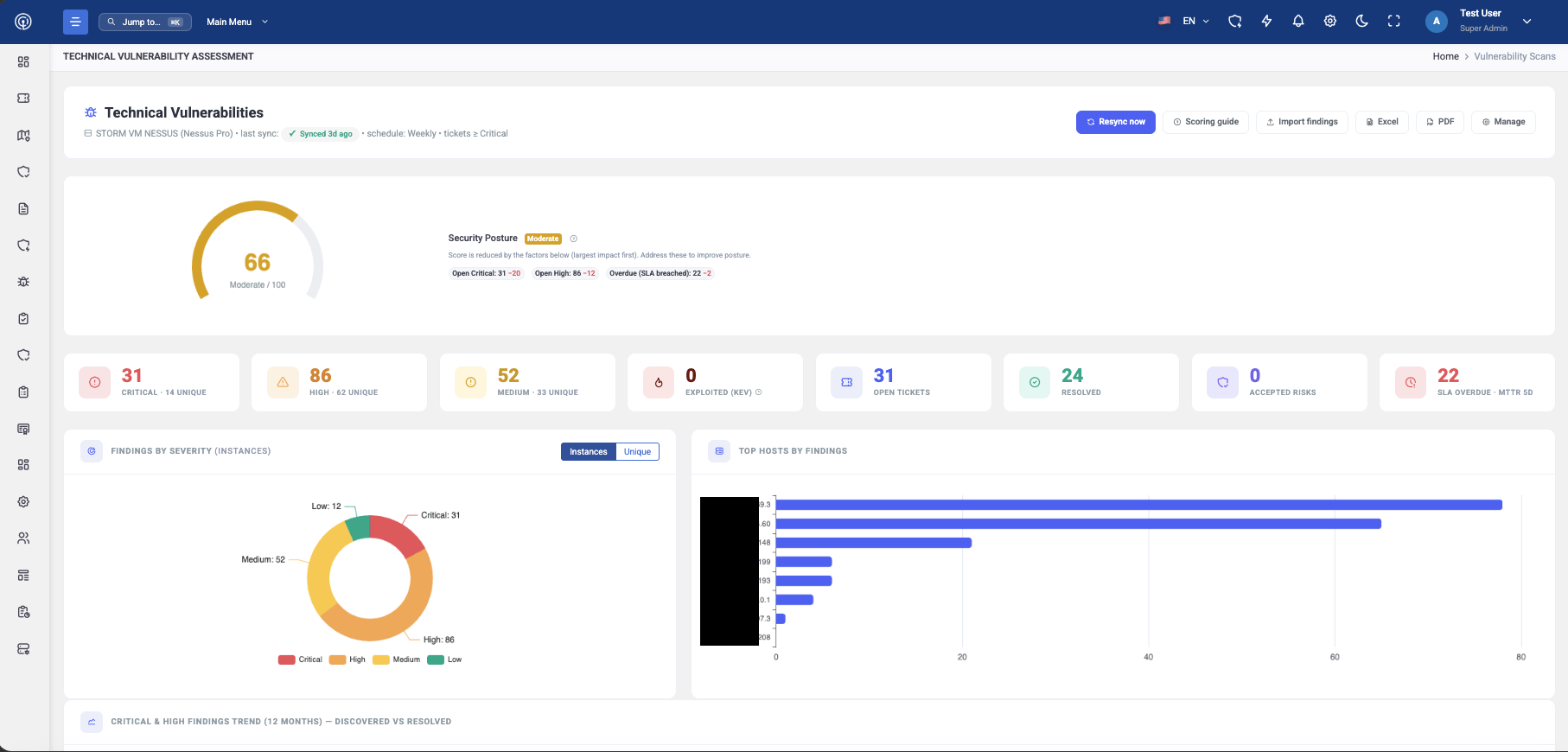
Aggregate results from vulnerability assessment sources and use interactive dashboards to monitor current posture, trends and remediation progress. Historical metrics help teams assess whether remediation performance is improving.
  • Multiple scanner and security-tool sources
  • Real-time posture, trend and progress dashboards
  • Historical remediation-effectiveness metrics
STORM Technical Vulnerabilities dashboard showing severity, KEV, ticket, resolution and SLA metrics
02 · Asset correlation

Give every finding operational context.

Link vulnerabilities to assets in the Risk Assessment Cartography Register. This creates a governed relationship between technical exposure and the services, systems or information represented by the asset model.

  • Cartography Register correlation
  • Shared asset context for prioritization
  • Centralized view across assessment sources
Documented correlationFinding → Cartography asset
03 · SLA remediation

Route priority findings into accountable work.

Use severity rules to create and assign tickets, monitor remediation against service levels and track the workflow through resolution. Guidance can be presented where available rather than promised for every finding.

  • Automated tickets for specified severity levels
  • Assignment and SLA tracking
  • Remediation guidance where applicable
A
Ticket createdSpecified severity condition reached
Assigned
B
Remediation trackedOwner · target date · SLA progress
Active
C
Outcome measuredResolution history and performance metrics
Evidence
SLA workflow modelBased on documented capabilities
04 · Exceptions and additional findings

Govern what cannot follow the standard path.

Manage exceptions and risk acceptance through approval workflows, and import findings from penetration tests or other activities using the documented spreadsheet template.

  • Exception and risk-acceptance approvals
  • Spreadsheet-based manual import
  • Support for penetration-test and other activity findings
01
Import findingsSpreadsheet template for additional sources
Imported
02
Request exceptionDocument the reason and approval path
Review
03
Record the decisionApproved exception or risk acceptance
Governed
Exception and import modelBased on documented capabilities
From discovery to evidence

Keep every remediation step connected and measurable.

STORM manages the workflow around technical findings while the named scanners remain responsible for producing source results.

01

Collect

Scanner, tool or manual findings

02

Correlate

Link to Cartography assets

03

Prioritize

CVSS, severity and KEV

04

Assign

Ticket, owner and target

05

Track

SLA and remediation workflow

06

Measure

History and outcome metrics

Product boundary

Clear about what is documented.

Validate sources, severity rules, SLAs and remediation ownership against the operational process you intend to run.

Supported by the product description

  • Aggregation from vulnerability scanners and security tools
  • Named Nessus and Microsoft Defender integrations
  • Real-time posture, trends and remediation-progress dashboards
  • Correlation with Cartography Register assets
  • CVSS scoring and CISA KEV classification support
  • SLA, historical metrics and severity-based ticketing
  • Exception and risk-acceptance approval workflows
  • Spreadsheet import for penetration-test or other findings

Confirm for your deployment

  • Exact connector coverage and configuration beyond named sources
  • Whether STORM performs scanning itself—it is documented as an aggregator
  • EPSS, exploit prediction or threat-based scoring beyond CVSS/KEV
  • Patch deployment, endpoint isolation or autonomous remediation
  • Rescan and remediation-validation behaviour
  • Exact ticket destination and Jira mapping for TVM workflows
  • Additional MDM/EDR integrations listed only on the roadmap
Practical questions

Test the workflow against your actual finding volume.

Bring representative scanners, severities, asset records, SLA rules and exception cases to the product walkthrough.

Which vulnerability sources are currently documented?
The technical description names Tenable Nessus and Microsoft Defender and describes aggregation from multiple scanners and security tools. Findings can also be imported manually through a spreadsheet template.
Does STORM replace a vulnerability scanner?
The product evidence describes STORM as centralizing findings from vulnerability-assessment sources. It does not state that STORM itself performs network, application or endpoint vulnerability scanning.
How are findings prioritized?
Documented capabilities include CVSS scoring, severity information and support for classification such as the CISA Known Exploited Vulnerabilities catalogue. The exact prioritization method should be reviewed for the intended deployment.
Can findings be connected to organizational assets?
Yes. STORM can correlate vulnerabilities with assets in the Risk Assessment Cartography Register, adding the asset relationship to the remediation workflow.
How does ticketing work?
The module documents automated ticket creation and assignment for specified severity levels, together with workflow and SLA tracking. The exact ticketing destination and whether a particular Jira configuration is used should be confirmed.
Can penetration-test findings be included?
Yes. Manual import through a spreadsheet template is documented for penetration-test findings and findings produced by other activities.
Does STORM automatically patch or isolate affected systems?
No patch deployment, endpoint isolation or autonomous remediation capability is documented. STORM governs prioritization, assignment, tracking, exceptions and remediation evidence around the finding.

Bring one scanner feed and one overdue critical finding.

Validate ingestion, asset correlation, severity logic, ticket assignment, SLA tracking and exception governance against the remediation process your teams already operate.

Book a STORM demo