
STORM Platform · Continuous Monitoring

Turn cloud configuration into continuous evidence.

Continuously validate Microsoft cloud security configurations, evaluate device, identity and security posture, map technical checks to frameworks and reuse applicable results in compliance assessments.

The current product description documents Microsoft-focused monitoring. Additional cloud infrastructure and MDM/EDR integrations are listed as roadmap items and are not presented here as currently available.

Configuration monitoringMicrosoft Graph connected
Check
Technical posture in compliance context

Configuration data becomes evaluated control status, framework coverage, historical results and reusable evidence.

EntraIdentity
IntuneDevices
DefenderSecurity
M365Cloud
MFA enforcement checkThreshold · severity · framework coverage
Evaluated
Device encryption checkCurrent state · implementation status · last detected
Visible
Microsoft GraphCollect documented Microsoft security configuration data.
Checks catalogEvaluate posture through predefined technical checks.
Framework mappedConnect technical checks with ISO/IEC 27001 and supported frameworks.
Evidence reusedPopulate applicable compliance responses from configuration data.
From point-in-time to operational

See configuration change before the next assessment cycle.

Manual attestations age quickly when identity, device and cloud settings keep changing. STORM connects Microsoft configuration data with a governed check catalog, evaluation logic, framework mappings and assessment evidence so technical posture can be reviewed in the same context as compliance.

01 · COLLECT

Connect configuration

Use Microsoft Graph to retrieve documented device, identity and security data.

02 · EVALUATE

Run technical checks

Apply predefined checks with configurable thresholds, grace periods and severity.

03 · MAP

Add framework context

Show which supported framework controls each technical check covers.

04 · EVIDENCE

Reuse the result

Feed applicable evaluated data into the Compliance Assessment workflow.

Inside the platform

Technical checks that stay connected to compliance.

The documented workflow combines Microsoft data collection, configurable validation, historical visibility, framework mapping and automated evidence.

01 · Checks catalog

Make the validation logic visible.

Use a library of predefined technical security configuration checks. Each catalog entry can expose its subject, severity, evaluation thresholds, grace period, framework coverage, current state, implementation status and last-detected context.
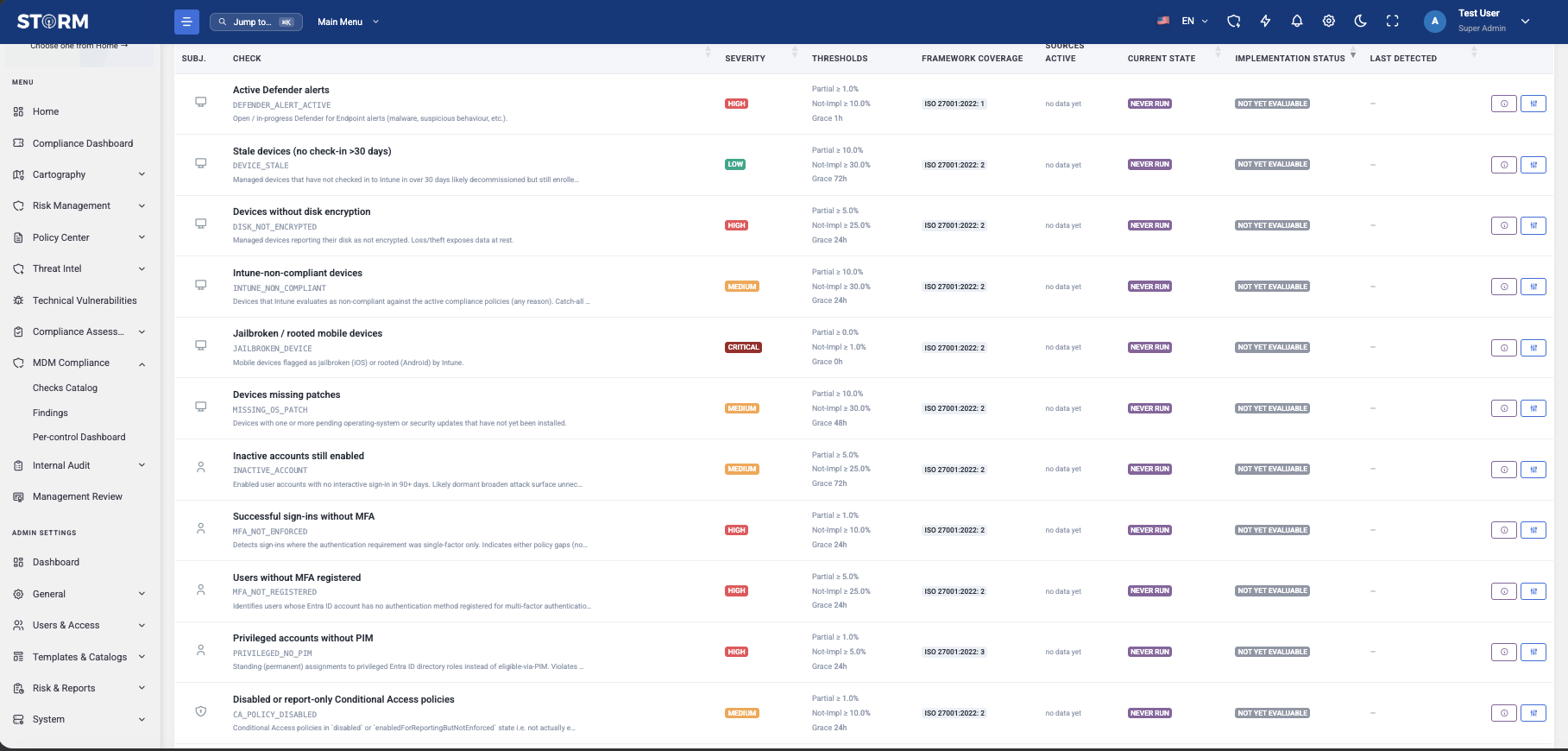
  • Predefined technical configuration checks
  • Severity, thresholds and grace periods
  • Framework coverage and execution history
STORM Checks Catalog showing security checks, severity, thresholds, framework coverage, state and implementation status
02 · Microsoft configuration data

Bring identity, device and security settings into one validation layer.

The documented Microsoft Graph integration collects security configuration data from Microsoft Entra ID, Intune, Defender, Azure, Sentinel and Microsoft 365 for continuous device, identity and security-posture checks.

  • Microsoft Graph API integration
  • Named Microsoft identity, device, security and cloud sources
  • Automatic control implementation-status evaluation
Documented current integrationConfiguration data → evaluated check
03 · Configurable evaluation

Apply thresholds that reflect the control intent.

Configure compliance thresholds, grace periods and severity for each technical control. STORM automatically evaluates implementation status and retains historical execution results and last-detection context for review.

  • Configurable partial and non-implementation thresholds
  • Grace-period and severity settings
  • Historical results and last-detection tracking
01
Define the checkSource, subject and expected technical state
Logic
02
Apply evaluation rulesThreshold, grace period and severity
Evaluate
03
Retain the outcomeStatus, execution history and last detection
History
Continuous validation modelCheck → evaluate → retain
04 · Framework mapping and evidence

Reuse technical truth inside the assessment.

Map technical checks to relevant ISO/IEC 27001 controls and other supported frameworks, show coverage for each check, and use evaluated configuration data as an evidence source for applicable Compliance Assessment responses.

  • Technical-check to framework-control mapping
  • Framework coverage visibility
  • Automated evidence and applicable response pre-population
Connected evidence workflowTechnical result → compliance context
05 · Objectives and KPIs

Monitor technical controls and management objectives in one rhythm.

The documented ISMS Objectives & KPIs module adds measurable objectives, one or more indicators, owners, target periods, units and performance thresholds. KPI values may be recorded manually or collected automatically where integrations are available.
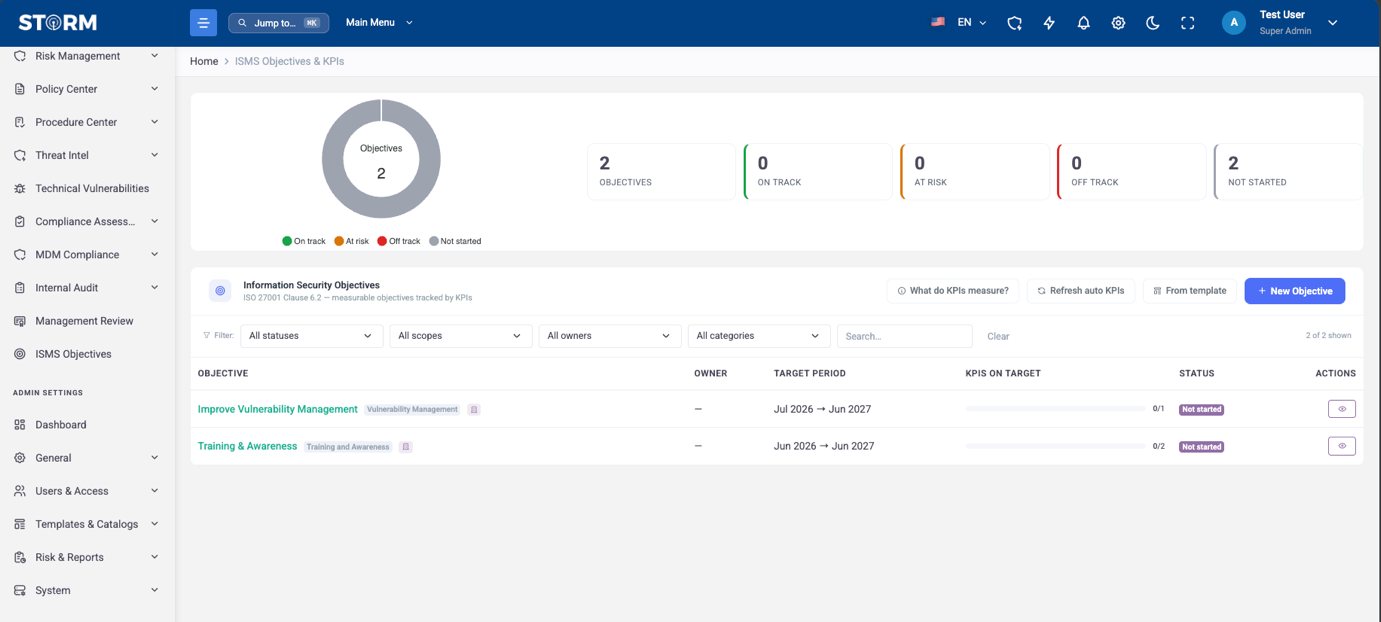
  • Custom objectives, KPI targets and owners
  • Manual and integration-dependent automated values
  • Historical trends and management reporting
STORM ISMS Objectives and KPIs dashboard showing objective status, owners, periods and KPI progress
From configuration to evidence

Keep the technical signal connected and reviewable.

STORM preserves the path from source configuration through evaluation and framework mapping to the evidence used in compliance oversight.

01

Connect

Microsoft Graph integration

02

Collect

Security configuration data

03

Evaluate

Thresholds and severity

04

Map

Framework control coverage

05

Evidence

Applicable assessment response

06

Review

History, dashboards and KPIs

Product boundary

Clear about what is documented.

Validate connector permissions, check coverage, evaluation cadence and evidence rules against the Microsoft environment and compliance programme you intend to monitor.

Supported by the product description

  • Continuous automated validation through Microsoft Graph
  • Named Entra ID, Intune, Defender, Azure, Sentinel and Microsoft 365 sources
  • Predefined checks with configurable thresholds, grace periods and severity
  • Automatic implementation-status evaluation
  • ISO/IEC 27001 and supported-framework mappings with coverage visibility
  • Historical execution results, last detection and posture dashboards
  • Automated evidence for applicable Compliance Assessment responses
  • Objectives and KPIs with manual or integration-dependent automated values

Confirm for your deployment

  • Exact Graph permissions, tenant prerequisites, supported checks and evaluation cadence
  • Exact framework mappings beyond the explicitly named ISO/IEC 27001 context
  • Whether a check reports, alerts or creates follow-up work in the intended configuration
  • Automated configuration changes, enforcement or autonomous remediation—not documented
  • Cloud infrastructure audit for GCP/AWS and additional MDM/EDR connectors—listed as roadmap
  • Automated KPI collection for a specific metric—available only where an integration supports it
  • 24×7 SOC monitoring of customer tenants—do not infer this from monitoring of STORM's own hosting environment
Practical questions

Validate the workflow with a real configuration check.

Bring one representative control, its Microsoft source, threshold logic, framework mapping and expected assessment response to the walkthrough.

Which systems are currently documented as monitoring sources?
The technical description names Microsoft Entra ID, Microsoft Intune, Microsoft Defender, Microsoft Azure, Microsoft Sentinel and Microsoft 365, with Microsoft Graph API integration used for automated configuration-data collection.
What does “continuous” mean in STORM?
The product description states continuous automated configuration validation and monitoring. It does not publish a universal execution interval, so the exact schedule and refresh behaviour should be confirmed for the intended deployment.
Can each technical check have its own evaluation rules?
Yes. Configurable compliance thresholds, grace periods and severity levels are documented for each technical control, together with automatic implementation-status evaluation.
Does STORM automatically change a failing Microsoft configuration?
Automated configuration enforcement or autonomous remediation is not documented. The stated capability is collection, validation, status evaluation, monitoring and evidence generation.
Can technical results support compliance assessments?
Yes. STORM documents automated evidence generation and integration with Compliance Assessment to pre-populate applicable framework-control responses from live configuration data.
Which frameworks can technical checks map to?
ISO/IEC 27001 mapping is explicitly documented, together with mappings to other supported compliance frameworks. The exact additional framework coverage should be reviewed in the check catalog for the intended deployment.
Are historical results retained?
Yes. Historical execution results and last-detection tracking are documented, along with dashboards for current compliance status and technical configuration health.
Does Continuous Monitoring include objectives and KPIs?
STORM has a documented ISMS Objectives & KPIs module for objectives, indicators, targets, thresholds, owners, periods and historical trends. KPI values can be manual or automated where a supporting integration is available.

Bring one Microsoft control and its expected state.

Validate collection, check logic, implementation status, history, framework mapping and assessment evidence against the environment your teams operate.

Book a STORM demo