
STORM Platform · Policy Management

Turn documents into governed workflows.

Author, review, approve, publish and acknowledge policies and procedures in one controlled workspace—with version history, audit trails and links to the controls they support.

The supplied technical description supports document authoring, templates, approvals, acknowledgements and integrations. It does not document AI policy generation, qualified e-signatures or a public trust centre as current capabilities.

Policy lifecycleGoverned record
Governance document

Information Security Policy

Version4.2OwnerSecurityReviewScheduled
AuthorReviewApproveAcknowledge
One libraryPolicies, procedures, standards, guidelines and governance documents.
Full historyVersion control with document history and audit trail.
GR + ENMultilingual documentation in Greek and English.
Email + TeamsNotifications and reminders for assigned workflow activity.
From files to governance

Keep every document current, owned and traceable.

A policy library becomes operational when teams can see which version applies, who must review it, which controls it supports and whether the right people acknowledged it. STORM brings those activities into one documented lifecycle rather than leaving them across folders, inboxes and spreadsheets.

01 · CREATE

Build and reuse

Author governance documentation and manage templates for policies, procedures, standards and guidelines.

02 · GOVERN

Review and approve

Route documents through configurable review and approval workflows with clear responsibility.

03 · COMMUNICATE

Track acknowledgement

Assign policy acknowledgements to users and retain reporting on completion status.

04 · CONNECT

Map to controls

Link documentation to compliance controls and frameworks so evidence remains easier to follow.

Inside the platform

One workspace for the complete document lifecycle.

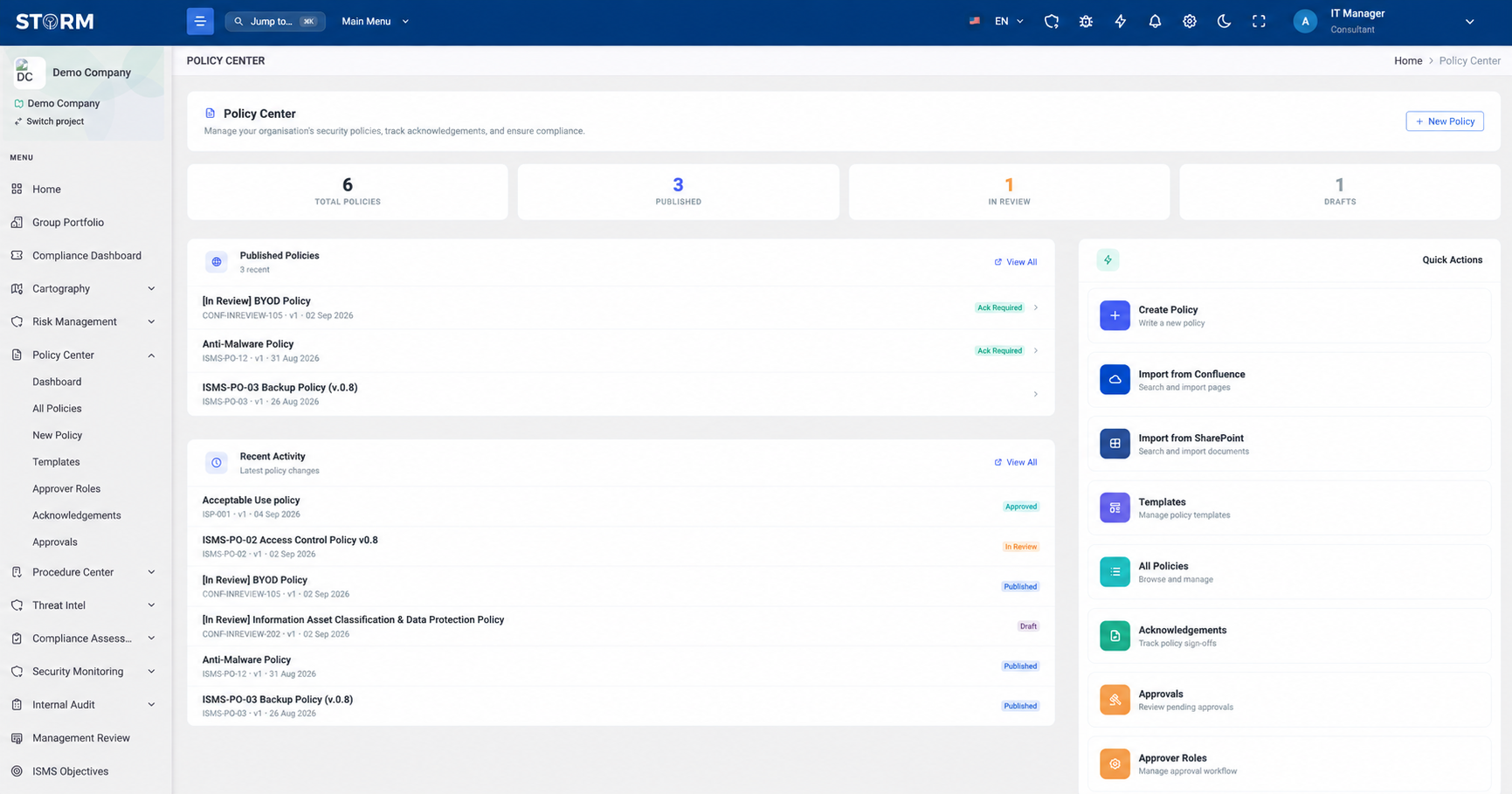
The Policy & Procedure Center combines the library, workflow state and user evidence needed to keep governance documents active.

01 · Central library

Find the document—and its real status.

Bring policies, procedures, standards, guidelines and other governance material into a searchable, categorized repository. The dashboard surfaces document status alongside pending approvals, reviews and acknowledgements.
  • Search, filtering and categorization
  • Document templates and authoring
  • Status, approval, review and acknowledgement visibility
STORM Policy Center interface showing governed documentation
02 · Controlled workflow

Move every change through accountable review.

Configure review and approval paths, retain the full document history and audit trail, and set recurring review schedules. Automated reminders help the next responsible person see what needs attention.

  • Configurable review and approval workflows
  • Version history and audit trail
  • Scheduled reviews with Email and Teams notifications
01
Document enters reviewNew document or controlled revision
Submitted
02
Assigned review takes placeConfigured review responsibility
In review
03
Approval is recordedDecision retained in the lifecycle
Approved
04
Next review scheduledReminder and notification workflow
Scheduled
Lifecycle modelBased on documented capabilities
03 · Evidence and alignment

Connect communication to compliance evidence.

Map documents to relevant controls and frameworks, distribute acknowledgements to users and report on completion. The record shows both the governance content and the activity around it.

  • Control and framework mapping
  • User acknowledgement tracking and reporting
  • Greek and English documentation support
A
Policy recordApproved version and complete history
Current
B
Control mappingsFramework and compliance relationships
Linked
C
User acknowledgementsAssigned, tracked and reportable
Tracked
Evidence chainBased on documented capabilities
Bring existing content

Connect the document sources teams already use.

The technical description distinguishes current integrations and their scope.

Existing documents

Import established content

Bring existing organizational documentation into the Policy & Procedure Center.

Microsoft SharePoint

Import and sync

Import and synchronise policies and procedures from authorized SharePoint locations.

Atlassian Confluence

Import documentation

Import existing documentation from Confluence into the centralized repository.

Email + Microsoft Teams

Notify and remind

Send workflow notifications and reminders for tasks, reviews, approvals and acknowledgements.

Product boundary

Clear about what is documented.

The workflow should be evaluated against your approval model, document sources and evidence requirements.

Supported by the product description

  • Central repository for policies, procedures, standards and guidelines
  • Authoring and document-template management
  • Configurable review and approval workflows
  • Version control, complete history and audit trail
  • User acknowledgement tracking and reporting
  • Control mapping, scheduled reviews and status dashboards
  • Greek and English documentation

Confirm for your deployment

  • AI-assisted document generation or review
  • Qualified electronic signatures or legal-signature workflows
  • Public trust centre or external policy portal
  • Retention, legal-hold and records-disposal rules
  • Exact out-of-the-box template catalogue
  • Bidirectional sync beyond documented SharePoint support
  • LMS connectivity, which is identified as a future integration
Practical questions

Test the workflow against how your organisation approves.

Use a real policy, approval chain and acknowledgement population during the product walkthrough.

Which document types can STORM manage?
The technical description identifies policies, procedures, standards, guidelines and other governance documentation within the centralized Policy & Procedure Center.
Does STORM retain document versions and approvals?
Yes. Version control, complete document history, an audit trail and configurable review and approval workflows are documented capabilities.
Can users acknowledge policies?
Yes. STORM supports policy acknowledgements with user tracking and reporting. Email and Microsoft Teams notifications can be used for documentation acknowledgements and other assigned workflow activity.
Can policies be linked to compliance requirements?
Yes. The product description documents mapping policies and related documents to compliance controls and frameworks, including examples such as ISO/IEC 27001, NIS 2 and GDPR.
Can we bring documents from SharePoint or Confluence?
Yes, with different documented scopes. SharePoint supports importing and synchronising policies and procedures from specified authorized locations. Confluence is documented for importing existing documentation; equivalent bidirectional synchronisation is not stated.
Does STORM currently integrate with an LMS?
Not as a documented current integration. LMS connectivity for assigning training and tracking status appears in the future-integration roadmap for Q2 2027 and should not be treated as currently available.

Bring one policy. Walk through its complete lifecycle.

Validate authoring, review, approval, version history, control mapping, acknowledgements and reminders against the way your organisation actually governs documents.

Book a STORM demo