
STORM Platform · Business Continuity

Know what must recover—and keep the plan connected.

Map business activities and dependencies, conduct business impact analysis, govern BCP and DRP documentation, and carry findings into audits, reviews and accountable actions.

STORM supports continuity planning, assessment, documentation and oversight. It is not presented as a disaster-recovery execution, automated failover or emergency mass-notification system.

Continuity workspaceProcesses mapped
BIA
Recovery context in one view

Critical activities, supporting assets, dependencies and documented recovery objectives connected to accountable owners.

MapActivities
MTPDImpact
RTOTarget
RPOData
Critical business processOwner · dependencies · recovery context
Assessed
BCP / DRP reviewVersion · approval · acknowledgement
Governed
Activity inventoryMaintain services, processes and critical business activities.
Connected BIAAssess operational impact in the context of assets and dependencies.
BCP + DRPGovern continuity plans, procedures, versions and approvals.
ISO 22301 oversightSupport assessments, internal audits, findings and reports.
From operational knowledge to resilience

Build continuity around what the business actually depends on.

A continuity plan is more useful when its processes, supporting assets, dependencies, impact decisions, owners and evidence share the same operating context. STORM connects those records so teams can move from inventory to assessment, planning and assurance without rebuilding the story in separate spreadsheets.

01 · MAP

Inventory activities

Identify services, processes, assets and the internal or external dependencies that support them.

02 · ASSESS

Understand impact

Use structured questionnaires to assess business and security consequences.

03 · PLAN

Govern response

Develop BCP, DRP, policies and procedures through controlled document workflows.

04 · IMPROVE

Close the loop

Connect assessments, internal audits, findings and management actions.

Inside the platform

A connected operating model for business continuity.

The documented workflow brings together business activity inventories, dependencies, BIA, controlled plans and assurance records.

01 · Business activity inventory

Start with the processes that must keep running.

Create and maintain services, processes and business activities, record their criticality and capture the continuity fields shown in the documented BIA workspace, including MTPD, RTO and RPO alongside managers and linked services.
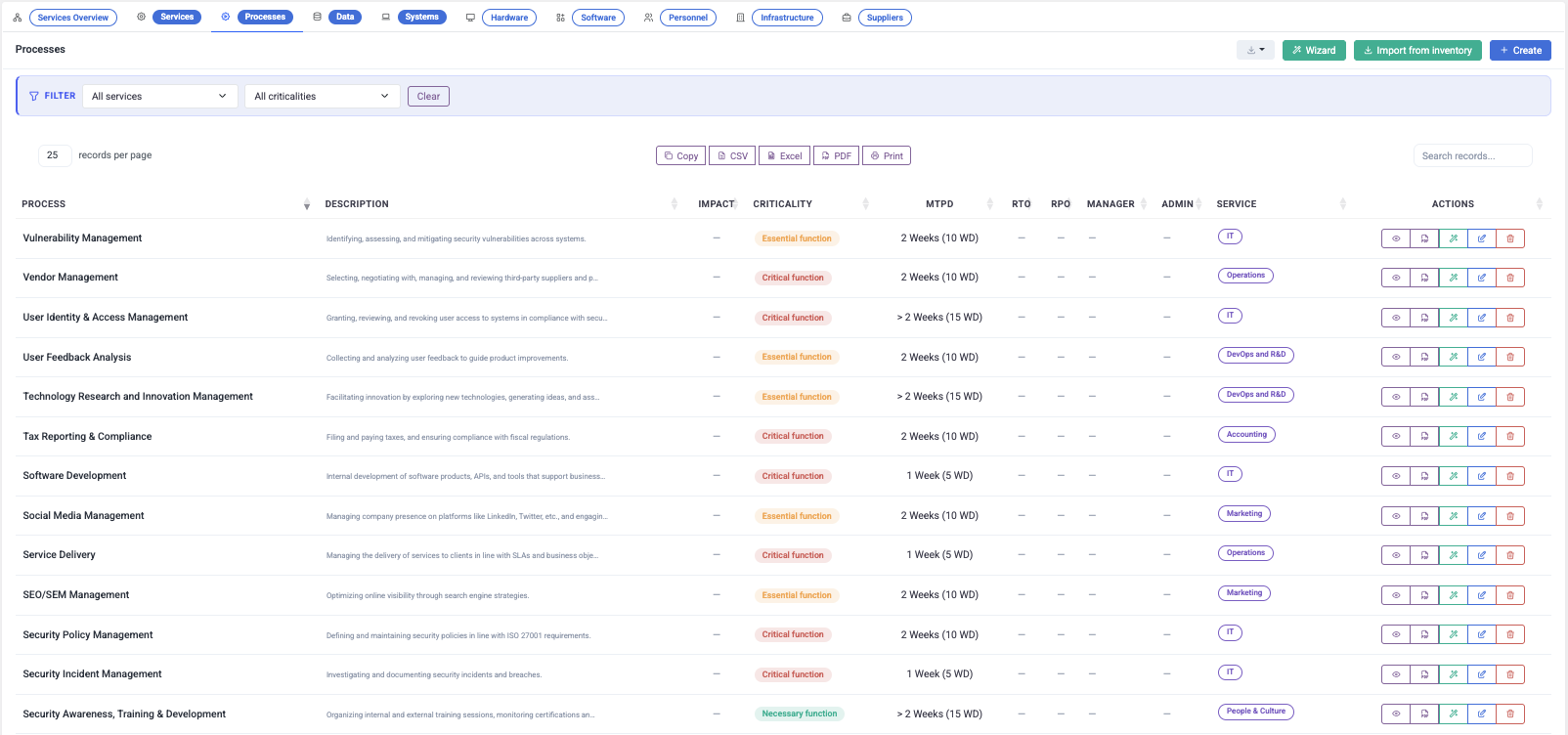
  • Services, processes and business activity inventory
  • Criticality and accountable management context
  • MTPD, RTO and RPO fields in the documented interface
STORM Processes workspace showing business process criticality, MTPD, RTO, RPO, managers and linked services
02 · Dependencies and assets

See what each critical activity relies on.

Use Cartography to identify ICT assets, internal and external system dependencies, data flows and asset interconnections. The shared asset model gives continuity analysis a governed operational foundation.

  • Internal and external system dependencies
  • Services, data, hardware, software, people and infrastructure
  • Asset inventory and dependency reporting
Connected operating contextProcess → supporting environment
03 · Business impact analysis

Assess consequences through a structured workflow.

Conduct BIA through online questionnaires and assess the impact associated with confidentiality, integrity or availability loss. The documented workflow considers legal, financial and business consequences and presents personal and consolidated results through charts.

  • Online impact-assessment questionnaires
  • Legal, financial and business consequence perspectives
  • PDF, DOCX and XLSX result exports
01
Scope the assessmentProcess, service or asset in operational context
BIA
02
Evaluate impactSecurity property and consequence perspectives
Assess
03
Review the resultPersonal and consolidated charts with exports
Report
Documented BIA workflowQuestionnaire → result → report
04 · Controlled continuity documentation

Keep BCP and DRP documentation current and accountable.

Develop BCP, DRP, policies and procedures, then manage them through the Documentation Center. Its documented lifecycle includes authoring or import, version history, configurable review and approval, acknowledgements, scheduled reviews and reminders.

  • BCP, DRP, policy and procedure management
  • Versions, review, approval and audit trail
  • Acknowledgements, reminders and status visibility
A
Author or importBuild the plan or bring existing documentation in
Draft
B
Review and approveConfigurable workflow with complete history
Review
C
Acknowledge and revisitUser tracking, schedules and reminders
Current
Governed document lifecyclePlan → approval → acknowledgement
05 · Assessment and assurance

Carry continuity gaps into owned improvement work.

Use supported ISO 22301 assessments and internal audits to identify gaps, register findings, assign responsible owners and monitor remediation. Documented reports include Business Impact Assessment Results and Asset Inventory & Dependencies.

  • ISO 22301 compliance assessments and internal audits
  • Finding ownership and remediation tracking
  • BIA and dependency reports for review and evidence
01
AssessReview supported ISO 22301 requirements
Coverage
02
AuditRecord observations and maintain traceability
Finding
03
ImproveAssign ownership and track corrective action
Action
Continuity assurance loopAssessment → finding → improvement
From inventory to improvement

Keep the continuity story connected and reviewable.

STORM links the records used to understand disruption impact, maintain plans and demonstrate that identified gaps are being managed.

01

Inventory

Services, processes and activities

02

Connect

Assets and dependencies

03

Assess

Business impact analysis

04

Plan

BCP, DRP and procedures

05

Assure

Assessment and internal audit

06

Improve

Owned remediation actions

Product boundary

Clear about what is documented.

Validate the assessment model, plan lifecycle and assurance scope against the continuity process your organization intends to operate.

Supported by the product description

  • Business activity, service and process inventories
  • Asset, dependency and data-flow mapping
  • Business impact analysis through online questionnaires
  • Legal, financial and business consequence perspectives
  • Personal and consolidated BIA results with PDF, DOCX and XLSX exports
  • BCP, DRP, policy and procedure management
  • Document versions, approvals, acknowledgements and review schedules
  • ISO 22301 assessments, internal audits, findings and reports

Confirm for your deployment

  • Exact BIA questionnaire, scoring model and organization-specific configuration
  • Whether recovery fields are calculated or entered—the source shows MTPD, RTO and RPO fields but does not state automated derivation
  • Exact ISO 22301 assessment content, edition and tailoring
  • Exercise scheduling, scenario simulation, call trees or emergency mass notification
  • Disaster-recovery orchestration, failover execution or infrastructure restoration
  • Automated dependency discovery or CMDB synchronization
  • Certification outcomes—using STORM does not itself certify an organization
Practical questions

Validate the workflow with a real critical process.

Bring one important service, its dependencies, a completed BIA and an existing continuity plan to the product walkthrough.

Can STORM support a Business Impact Analysis?
Yes. The product description documents BIA through online questionnaires, impact evaluation across security properties and legal, financial and business consequences, result charts, and PDF, DOCX and XLSX exports.
Can business processes be connected to supporting assets?
STORM documents service and process inventories together with an asset model, internal and external system dependencies, data flows and asset interconnections. The exact relationship design should be validated with your operating model.
Can BCP and DRP documents be managed in STORM?
Yes. Developing BCP and DRP documentation is listed as a STORM capability, while the Documentation Center provides authoring or import, version history, review and approval, acknowledgements, schedules and reminders.
Does STORM automatically calculate MTPD, RTO and RPO?
The documented product interface includes MTPD, RTO and RPO fields. The source does not state that STORM automatically derives those values, so the calculation and approval method should be confirmed for the intended deployment.
Does STORM run continuity exercises or simulate outages?
Exercise scheduling and outage simulation are not stated as STORM product capabilities in the technical description. Do not infer them from ICT PROTECT's own continuity and disaster-recovery practices.
Does STORM execute disaster recovery or infrastructure failover?
No such execution capability is documented. STORM supports governance, analysis, documentation, assessments, audit traceability and accountable actions around the continuity programme.
How does STORM support ISO 22301 work?
The documented platform supports ISO 22301 assessments and framework-specific internal audits, including audit reports, findings, owners and remediation tracking. This supports programme oversight but does not itself grant certification.
Which continuity reports are documented?
The technical description lists Asset Inventory & Dependencies and Business Impact Assessment Results among the available reports, alongside internal audit and self-assessment reporting.

Bring one critical process and its continuity plan.

Validate the activity inventory, dependency model, BIA, controlled document lifecycle and assurance trail against the programme your teams already operate.

Book a STORM demo